Troubleshooting
This page is the operator and admin troubleshooting index. Use it when something looks wrong and you need a practical path to confirm the issue before escalating or changing configuration.
General Troubleshooting Order
For most issues, work in this order:
- check the dashboard for current health signals
- confirm whether Quick Play is active
- confirm the affected screen, player, or target
- use preview to verify the generated result
- use logs to verify what actually happened
- inspect the relevant configuration or escalate
This order helps separate scheduling problems from runtime problems.
Login And License Issues
Symptoms:
- users cannot sign in
- the app appears blocked by license state
- expected admin areas are unavailable
Check:
- whether the server is reachable at the expected address and port
- whether the active license exists and is valid
- whether the correct user credentials are being used
- whether the issue affects one user or all users
Escalate when:
- the active license is missing, expired, or invalid
- no known admin account can sign in
- the server is reachable but authentication still fails broadly
Upload And Asset Issues
Symptoms:
- uploads fail
- an asset uploads but cannot be previewed
- metadata looks wrong after upload
- content is missing from scheduling workflows
Check:
- whether file-based assets are allowed by preferences
- whether the file is still processing
- whether the asset duration and metadata are correct
- whether extension validation or required fields are blocking completion
Escalate when:
- upload repeatedly fails for valid files
- processing never completes
- multiple operators see the same issue across assets
Scheduling And Preview Issues
Symptoms:
- the calendar looks correct but playback does not
- preview does not match operator expectations
- an event does not seem to affect playback
Check:
- whether the event is published
- whether the event is active in the selected time window
- whether the correct screen is selected
- whether overlapping occurrence rules are affecting the result
- whether Quick Play is overriding the normal schedule
Escalate when:
- preview consistently disagrees with the documented scheduling logic
- a published active event is ignored unexpectedly
- playlist generation appears inconsistent for the same inputs
Player, Screen, And Output Issues
Symptoms:
- the wrong content is on-screen
- nothing appears on-screen
- failover behaves incorrectly
- a player is online but playback quality is poor
Check:
- whether the player is alive and recently seen
- whether frame rate is degraded
- whether the intended output is active
- whether target failover mode is correct
- whether screen mapping or crossfade changes were made recently
Escalate when:
- a player repeatedly drops offline
- output switching does not match configuration
- a runtime issue persists even when preview and schedule look correct
Systems And Integration Issues
Symptoms:
- an external system shows warning or offline state
- a dashboard integration behaves unexpectedly
- a restart control does not resolve the issue
Check:
- the system status shown on the dashboard
- any linked external dashboard or console
- whether the issue affects playback, automation, or monitoring only
- whether a known maintenance or outage window exists
Escalate when:
- the system is required for current operation
- restart does not restore expected state
- multiple dependent workflows are affected
Logs And Reporting Issues
Symptoms:
- playback evidence is needed
- someone disputes whether content played
- historical playback behavior is unclear
Check:
- the selected reporting window
- the chosen screen and player filters
- whether the relevant asset IDs are included
- whether the exported CSV confirms the suspected issue
Escalate when:
- logs are missing expected entries
- report totals do not align with raw entries
- logging appears to have stopped entirely
API And Integration Issues
Symptoms:
- API requests fail unexpectedly
- uploads work in the UI but not in an integration
- subscriptions do not behave as expected
Check:
- whether the request is going to
/graphql - whether the raw session token is sent in
Authorization - whether multipart upload is being used for files
- whether the integration depends on subscription auth that has not been validated
Escalate when:
- authenticated HTTP requests fail with a known-good session
- multipart upload works in the UI but not in external tooling
- subscription behavior is required but unreliable
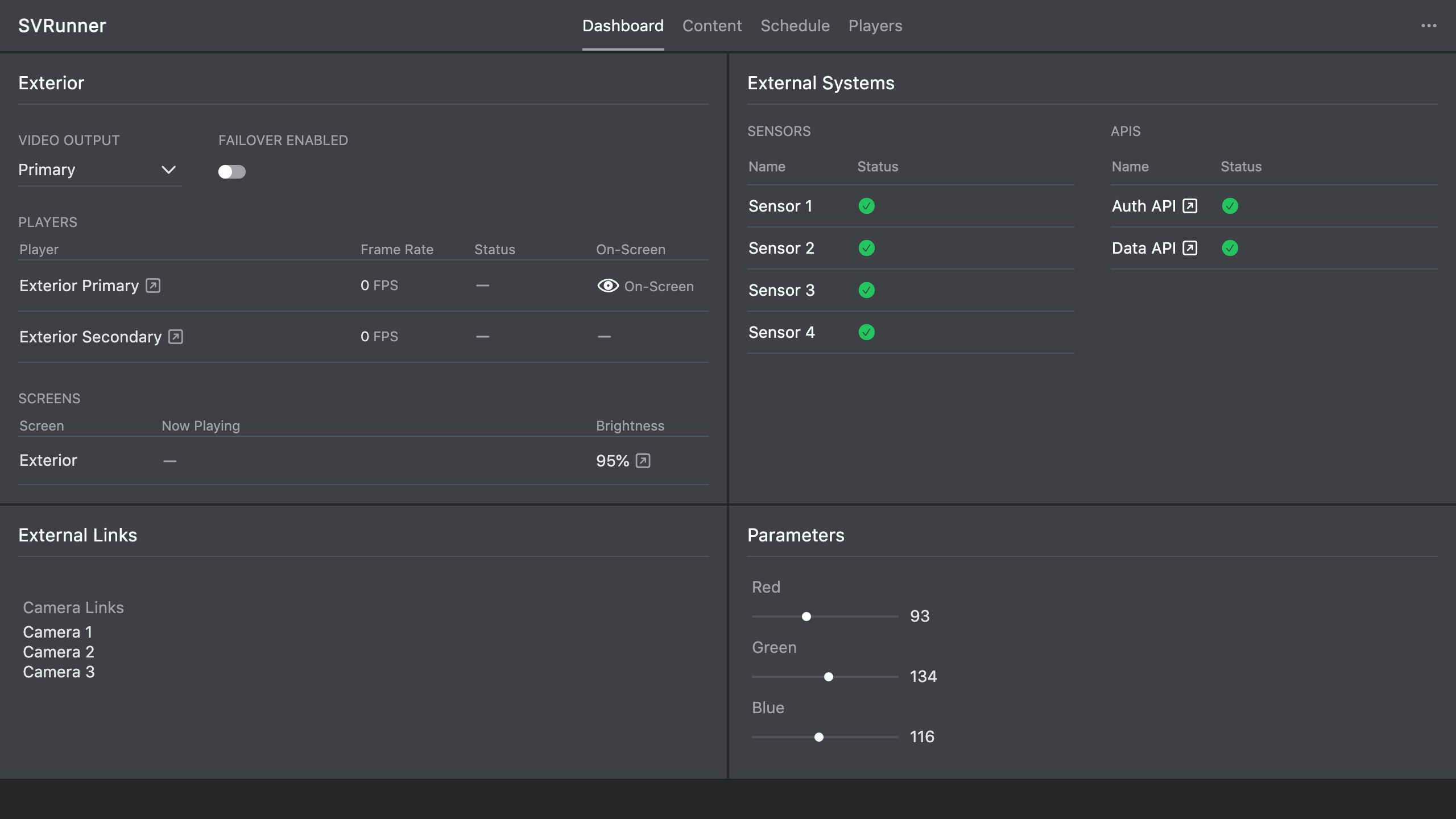 Stub screenshot: small annotated dashboard screenshot showing where to check Quick Play, player health, and systems first. Save final image at
 packages/docs/screenshots/operations-troubleshooting-dashboard-index.png.